Connect company goals to individual priorities, weekly planning, and team progress.
What you’ll learn
You’ll learn how to review company priorities, explore a teammate’s goals, and use a check-in to connect annual goals with quarterly, monthly, and weekly action. You’ll also see how to ask StratSync questions about ownership, alignment, and progress. StratSync focuses on the most important priorities. Focus on the 20% of work that drives 80% of results.
Watch the walkthrough
Plan and review your priorities
1
Review the company’s goals
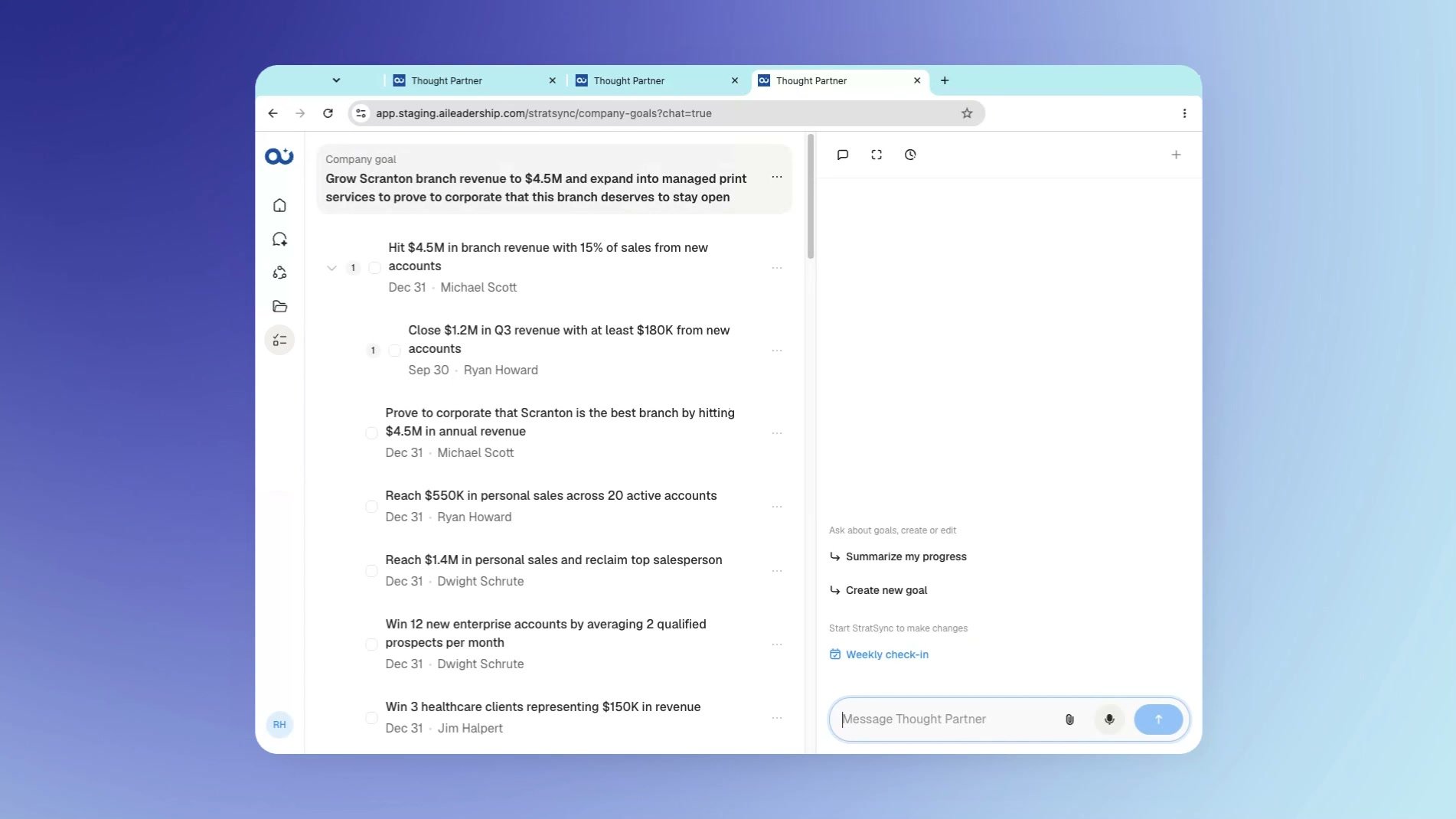
Open Company goals. The main company goal appears at the top, with supporting priorities below it.Goals can be updated in real time, so this view can reflect the company’s current priorities.
Company goals shows the main goal and the priorities supporting it.
2
Ask a question about a company priority
Use the chat alongside the goals to ask about what you see. For example, ask: “Who owns our managed print services goal?”StratSync uses the company goal context to answer.
3
Explore a teammate’s goals
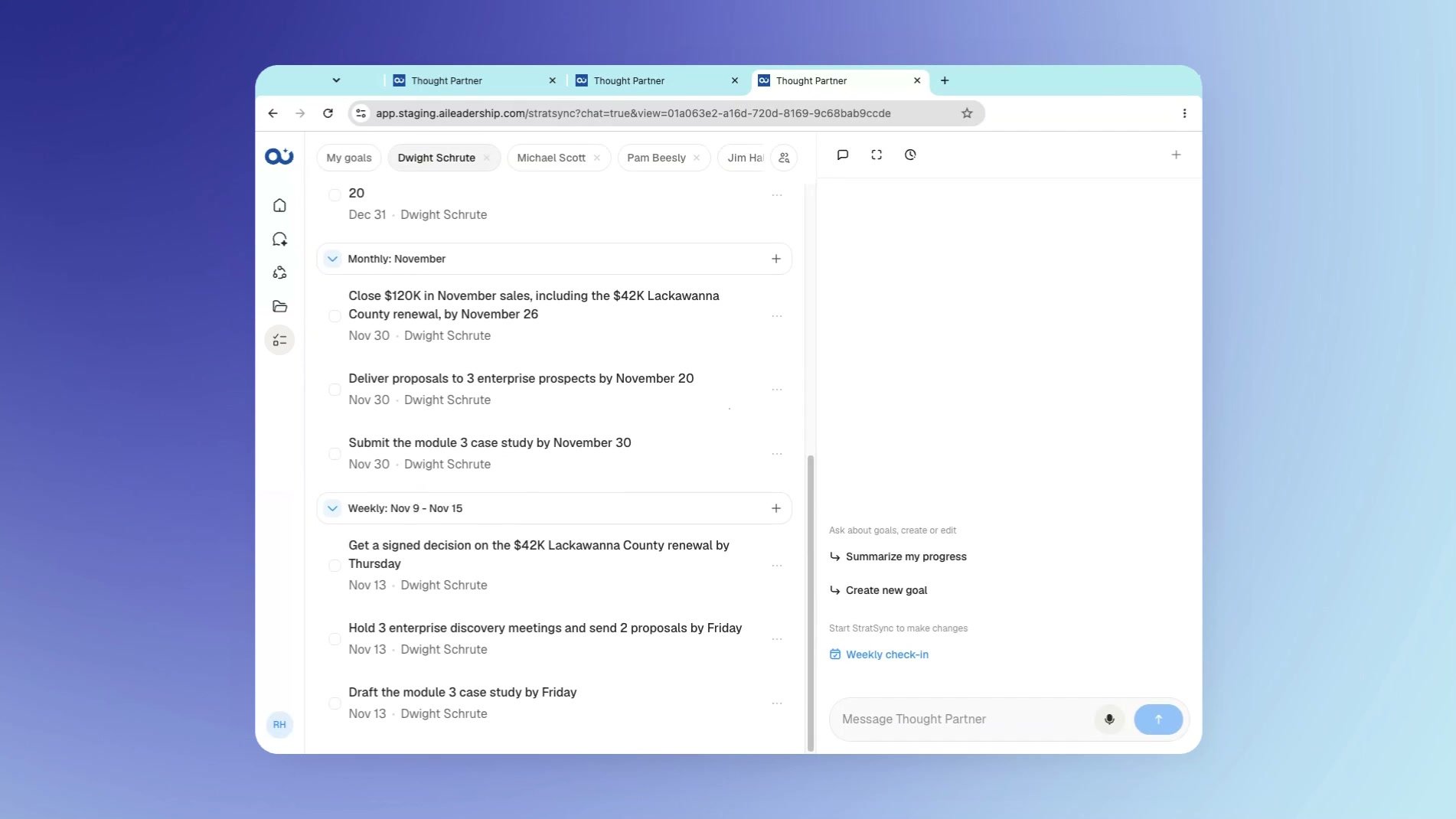
Select a teammate in the goals view. Review how their annual goals connect to quarterly goals, monthly priorities, and weekly actions.You can ask how that work connects to company goals. For example, ask: “How do Dwight’s goals this week connect to our company goals?”
A teammate’s goals show monthly priorities and weekly actions.
4
Start a weekly check-in
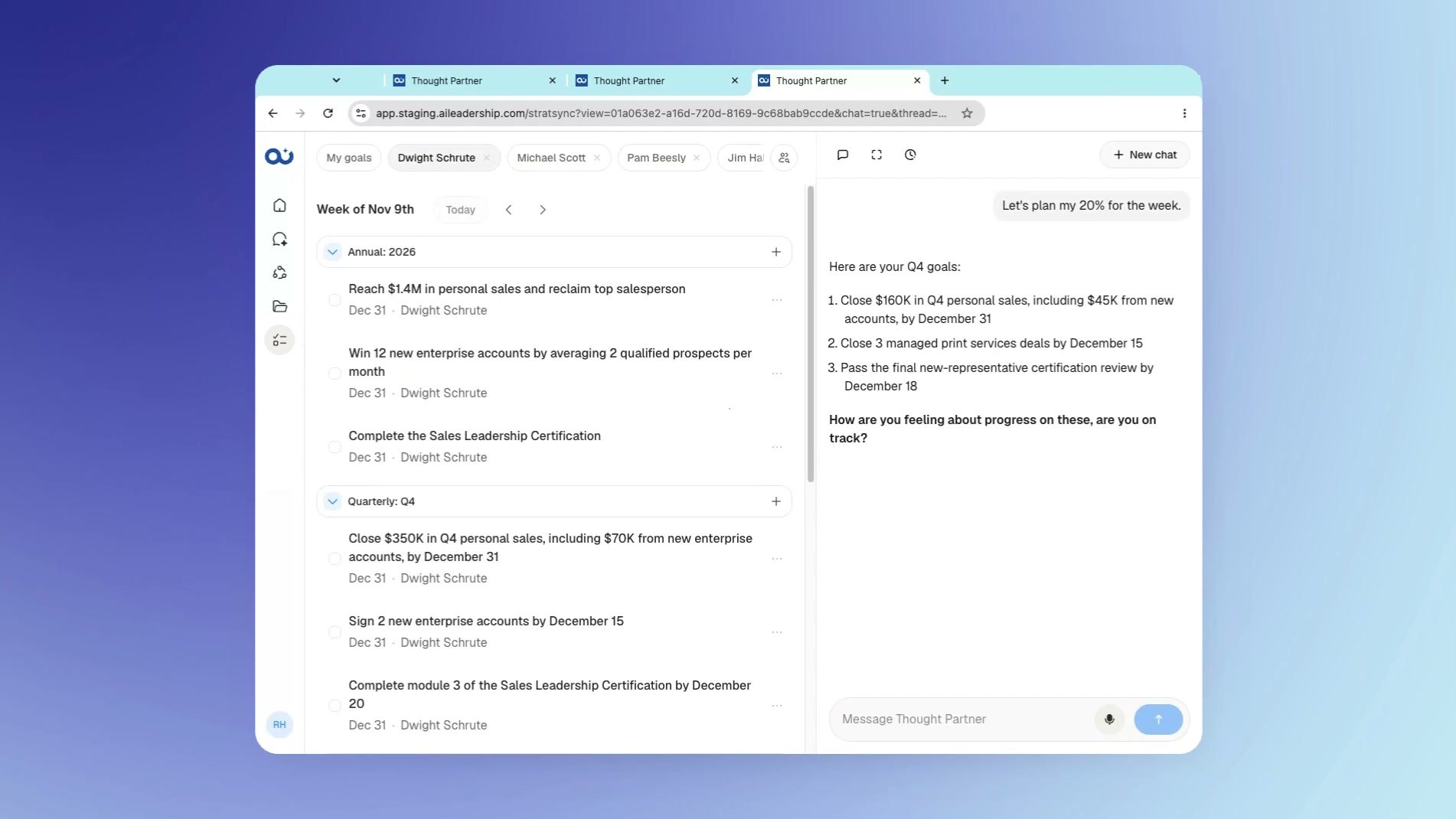
Open Weekly check-in. Start with: “Let’s plan my 20% for the week.”The check-in guides planning across annual, quarterly, monthly, and weekly levels. Consider what this quarter needs to accomplish for the year, what this month needs to accomplish for the quarter, and what this week needs to move forward.
The check-in opens with goals beside a planning conversation.
5
Make your goals clear
The thought partner asks you to sharpen vague goals. An answer such as “work on sales stuff” prompts further questions until the goal meets the SMART goal framework.Use that conversation to make your priorities clear, actionable, and achievable. Allow about 15 minutes for a check-in.
6
Ask about the team’s progress
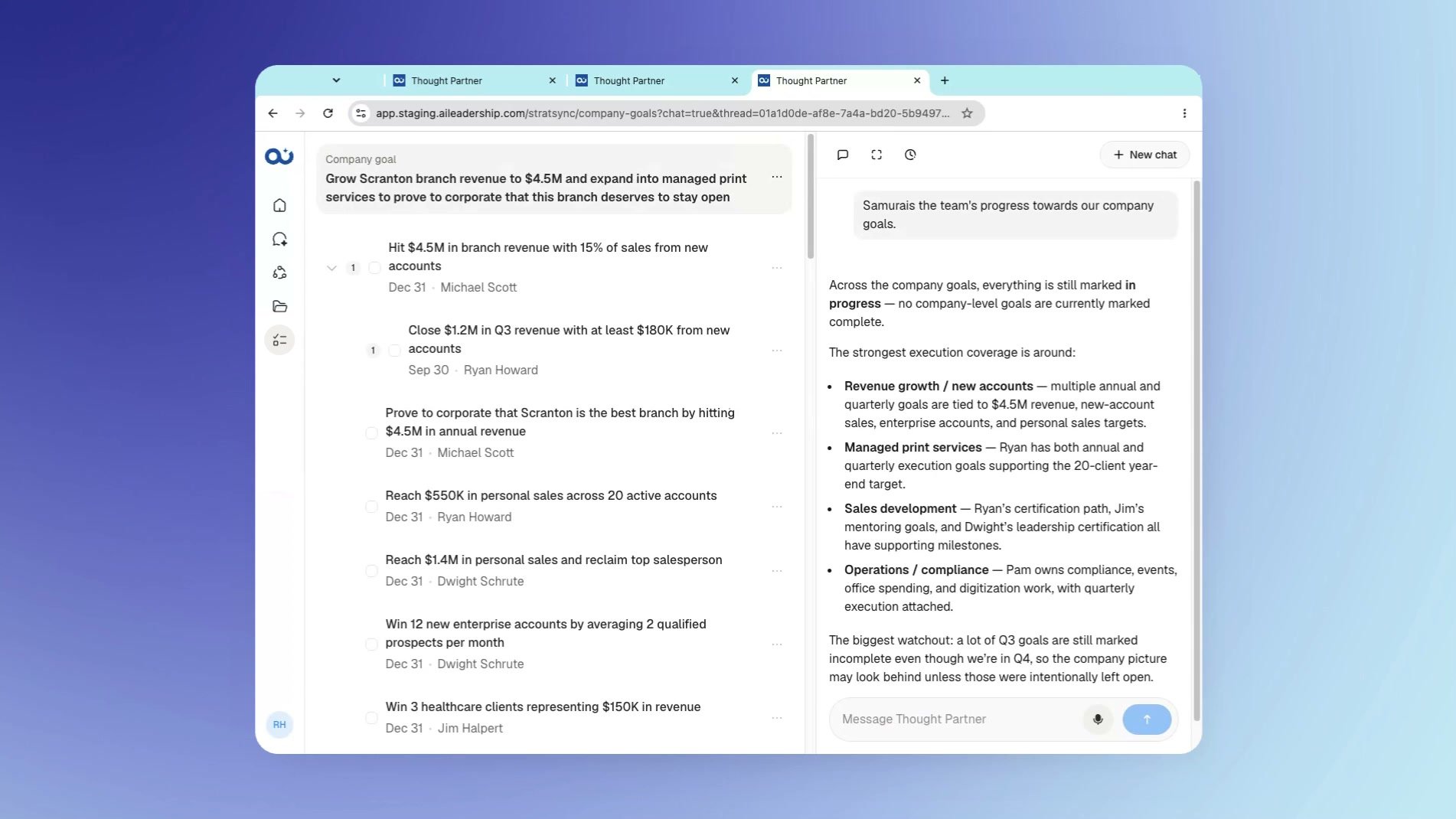
In the company goals view, ask: “Summarize the team’s progress towards our company goals.”The answer brings together progress, work that may be falling behind, and how individual execution connects to company priorities.
Ask for a view of team progress toward company goals.
Get more from the conversation
Tell the thought partner what you’re working on and ask it to push back on your thinking. You can also ask a direct question such as “What is Dwight focused on this week?” to explore a teammate’s priorities.For help with sign-in, voice, and other common questions, see FAQ and helpful tips.
Key takeaways
Focus on the priorities that make the biggest difference to company results.
Review how individual goals connect to company priorities across planning levels.
Use check-ins to connect longer-term goals to the week ahead.
Refine vague goals through questions from the thought partner.
Ask StratSync about ownership, alignment, and progress.
FAQ
What work belongs in StratSync?
Use StratSync for the top priorities that drive results. It is not intended to track every small item on your to-do list.
How long does a check-in take?
A check-in takes about 15 minutes and covers annual, quarterly, monthly, and weekly planning in one flow.
What happens if my goal is too vague?
The thought partner asks you to sharpen it until it meets the SMART goal framework. For example, “work on sales stuff” needs more detail.
Can StratSync fit our company’s planning approach?
Yes. StratSync can be tailored to objectives and key results (OKRs), with weekly, monthly, or quarterly check-ins and questions customized to the company.
Can I ask how someone’s weekly goals support company goals?
Yes. Open a teammate’s goals and ask how that person’s work for the week connects to company goals.
{"docsConfig":{"theme":"mint","$schema":"https://mintlify.com/docs.json","name":"AI Thought Partner","colors":{"primary":"#004FA6","light":"#97C0F9","dark":"#3688F8"},"logo":{"light":"https://mintcdn.com/ai-leadership-24dcf0fb/SeCygQZgaY3VaFw8/images/logo-light.svg?fit=max\u0026auto=format\u0026n=SeCygQZgaY3VaFw8\u0026q=85\u0026s=90a4ec0887ae92c3aed27a6e8acf2e8d","dark":"https://mintcdn.com/ai-leadership-24dcf0fb/SeCygQZgaY3VaFw8/images/logo-dark.svg?fit=max\u0026auto=format\u0026n=SeCygQZgaY3VaFw8\u0026q=85\u0026s=48eda66bb72fbf2e39bd2abbdd64f562"},"favicon":"https://mintcdn.com/ai-leadership-24dcf0fb/SeCygQZgaY3VaFw8/images/favicon.svg?fit=max\u0026auto=format\u0026n=SeCygQZgaY3VaFw8\u0026q=85\u0026s=9c3a63524eb107692fc0b43c620dd4b2","appearance":{"default":"light"},"background":{"color":{"light":"#FBF9F9","dark":"#1C1B17"}},"navbar":{"primary":{"type":"button","label":"Open AI Thought Partner","href":"https://app.aileadership.com"}},"fonts":{"family":"Geist"},"styling":{"latex":false},"navigation":{"pages":[]}},"deployment":{"deploymentMetadataValue":{"subdomain":"ai-leadership-24dcf0fb","hasAudioNarration":false,"actualSubdomain":"ai-leadership-24dcf0fb","customDomains":[],"gitSource":{"type":"github","owner":"ai-leadership","repo":"aitp-docs","deployBranch":"main","contentDirectory":"","isPrivate":true,"mountPath":"","label":"","_id":"6afc951c4d337708aa9a5fe3"},"entitlements":{},"buildId":"6afe35ed511184f1b8dccae9","clientVersion":"0.0.4227","searchFilterCounts":[{"language":"default","tag":"Start here","count":2},{"language":"default","tag":"Help","count":1},{"language":"default","tag":"Interviews","count":1},{"language":"default","tag":"StratSync","count":1}]},"assistantConfig":{"enableAskAiButton":false,"enableStarterQuestions":false,"enableContextualStarterQuestions":false,"enableAskAiSearchBar":true},"basePath":"","hasChatPermissions":false,"hasWebMcpPermissions":false,"toggles":[{"name":"kill-isr","enabled":true,"variant":{"name":"disabled","enabled":false,"feature_enabled":true},"impressionData":false},{"name":"custom-rbac-roles","enabled":true,"variant":{"name":"disabled","enabled":false,"feature_enabled":true},"impressionData":false},{"name":"agent-mintlify-slack","enabled":true,"variant":{"name":"disabled","enabled":false,"feature_enabled":true},"impressionData":false},{"name":"agent-integrations-settings","enabled":true,"variant":{"name":"disabled","enabled":false,"feature_enabled":true},"impressionData":false},{"name":"rbac-expansion","enabled":true,"variant":{"name":"disabled","enabled":false,"feature_enabled":true},"impressionData":false},{"name":"automations-pr-grouping","enabled":true,"variant":{"name":"disabled","enabled":false,"feature_enabled":true},"impressionData":false},{"name":"custom-prefix","enabled":true,"variant":{"name":"disabled","enabled":false,"feature_enabled":true},"impressionData":false},{"name":"analytics-v7","enabled":true,"variant":{"name":"disabled","enabled":false,"feature_enabled":true},"impressionData":false},{"name":"user-flows-analytics","enabled":true,"variant":{"name":"disabled","enabled":false,"feature_enabled":true},"impressionData":false},{"name":"no-publish-flow","enabled":true,"variant":{"name":"disabled","enabled":false,"feature_enabled":true},"impressionData":false},{"name":"workos-onboarding","enabled":true,"variant":{"name":"disabled","enabled":false,"feature_enabled":true},"impressionData":false},{"name":"snapshot-serving-live","enabled":true,"variant":{"name":"disabled","enabled":false,"feature_enabled":true},"impressionData":false},{"name":"stripTemperatureMiddleware","enabled":true,"variant":{"name":"disabled","enabled":false,"feature_enabled":true},"impressionData":false},{"name":"support-platform-pylon-zendesk","enabled":true,"variant":{"name":"disabled","enabled":false,"feature_enabled":true},"impressionData":false},{"name":"snapshot-serving","enabled":true,"variant":{"name":"disabled","enabled":false,"feature_enabled":true},"impressionData":false},{"name":"instant-rollback","enabled":true,"variant":{"name":"disabled","enabled":false,"feature_enabled":true},"impressionData":false},{"name":"granular-notifications-server","enabled":true,"variant":{"name":"disabled","enabled":false,"feature_enabled":true},"impressionData":false},{"name":"granular-notifications","enabled":true,"variant":{"name":"disabled","enabled":false,"feature_enabled":true},"impressionData":false},{"name":"automations-fable","enabled":true,"variant":{"name":"disabled","enabled":false,"feature_enabled":true},"impressionData":false},{"name":"fixed-ai-action-pricing","enabled":true,"variant":{"name":"disabled","enabled":false,"feature_enabled":true},"impressionData":false},{"name":"automation-resolve-merge-conflict","enabled":true,"variant":{"name":"disabled","enabled":false,"feature_enabled":true},"impressionData":false},{"name":"scoped-publishing","enabled":true,"variant":{"name":"disabled","enabled":false,"feature_enabled":true},"impressionData":false},{"name":"mintql","enabled":true,"variant":{"name":"disabled","enabled":false,"feature_enabled":true},"impressionData":false},{"name":"page-level-analytics","enabled":true,"variant":{"name":"disabled","enabled":false,"feature_enabled":true},"impressionData":false},{"name":"editor-version-history-v2","enabled":true,"variant":{"name":"disabled","enabled":false,"feature_enabled":true},"impressionData":false},{"name":"billing-page-v2","enabled":true,"variant":{"name":"disabled","enabled":false,"feature_enabled":true},"impressionData":false},{"name":"full-page-search","enabled":true,"variant":{"name":"disabled","enabled":false,"feature_enabled":true},"impressionData":false},{"name":"workspace-projects","enabled":true,"variant":{"name":"disabled","enabled":false,"feature_enabled":true},"impressionData":false},{"name":"assistant-v5","enabled":true,"variant":{"name":"disabled","enabled":false,"feature_enabled":true},"impressionData":false},{"name":"fork-pr-previews","enabled":true,"variant":{"name":"disabled","enabled":false,"feature_enabled":true},"impressionData":false},{"name":"revalidation-jwt","enabled":true,"variant":{"name":"disabled","enabled":false,"feature_enabled":true},"impressionData":false},{"name":"workos-sso-scim","enabled":true,"variant":{"name":"disabled","enabled":false,"feature_enabled":true},"impressionData":false},{"name":"hobby-abuse-scan","enabled":true,"variant":{"name":"disabled","enabled":false,"feature_enabled":true},"impressionData":false},{"name":"dashboard-inbox","enabled":true,"variant":{"name":"disabled","enabled":false,"feature_enabled":true},"impressionData":false},{"name":"workos-signup","enabled":true,"variant":{"name":"disabled","enabled":false,"feature_enabled":true},"impressionData":false},{"name":"turbopuffer-dual-write","enabled":true,"variant":{"name":"disabled","enabled":false,"feature_enabled":true},"impressionData":false},{"name":"workos-enabled","enabled":true,"variant":{"name":"disabled","enabled":false,"feature_enabled":true},"impressionData":false},{"name":"approve-review-flow","enabled":true,"variant":{"name":"disabled","enabled":false,"feature_enabled":true},"impressionData":false},{"name":"editor-metadata","enabled":true,"variant":{"name":"disabled","enabled":false,"feature_enabled":true},"impressionData":false},{"name":"sso-setup-deadline-banner","enabled":true,"variant":{"name":"disabled","enabled":false,"feature_enabled":true},"impressionData":false},{"name":"turbopuffer-serve","enabled":true,"variant":{"name":"disabled","enabled":false,"feature_enabled":true},"impressionData":false},{"name":"live-agents","enabled":true,"variant":{"name":"disabled","enabled":false,"feature_enabled":true},"impressionData":false},{"name":"starter-pricing","enabled":true,"variant":{"name":"control","enabled":true,"payload":{"type":"string","value":"control"},"feature_enabled":true},"impressionData":false},{"name":"llms-txt-v2","enabled":true,"variant":{"name":"disabled","enabled":false,"feature_enabled":true},"impressionData":false},{"name":"wildcard-email-auth","enabled":true,"variant":{"name":"disabled","enabled":false,"feature_enabled":true},"impressionData":false}],"googleFontsInlined":true},"customCss":[]}
{"page":{"pagePath":"stratsync/basics","slug":"/stratsync/basics","pageMetadata":{"title":"Plan and track your priorities","sidebarTitle":"Plan and track priorities","description":"Connect company goals to individual priorities, weekly planning, and team progress.","href":"/stratsync/basics"},"description":{"compiledSource":"\"use strict\";\nconst {jsx: _jsx} = arguments[0];\nconst {useMDXComponents: _provideComponents} = arguments[0];\nfunction _createMdxContent(props) {\n const _components = {\n p: \"p\",\n ..._provideComponents(),\n ...props.components\n };\n return _jsx(_components.p, {\n children: \"Connect company goals to individual priorities, weekly planning, and team progress.\"\n });\n}\nfunction MDXContent(props = {}) {\n const {wrapper: MDXLayout} = {\n ..._provideComponents(),\n ...props.components\n };\n return MDXLayout ? _jsx(MDXLayout, {\n ...props,\n children: _jsx(_createMdxContent, {\n ...props\n })\n }) : _createMdxContent(props);\n}\nreturn {\n default: MDXContent\n};\n","frontmatter":{},"scope":{}},"pageType":"default","mdx":{"mdxSource":{"compiledSource":"\"use strict\";const{Fragment:_Fragment,jsx:_jsx,jsxs:_jsxs}=arguments[0];const{useMDXComponents:_provideComponents}=arguments[0];function _createMdxContent(props){const _components={a:`a`,li:`li`,p:`p`,strong:`strong`,ul:`ul`,..._provideComponents(),...props.components},{Accordion,AccordionGroup,Frame,Heading,OptimizedImage,Step,Steps}=_components;if(!Accordion)_missingMdxReference(`Accordion`,true);if(!AccordionGroup)_missingMdxReference(`AccordionGroup`,true);if(!Frame)_missingMdxReference(`Frame`,true);if(!Heading)_missingMdxReference(`Heading`,true);if(!OptimizedImage)_missingMdxReference(`OptimizedImage`,true);if(!Step)_missingMdxReference(`Step`,true);if(!Steps)_missingMdxReference(`Steps`,true);return _jsxs(_Fragment,{children:[_jsx(Heading,{level:`2`,id:`what-you’ll-learn`,children:`What you’ll learn`}),`\n`,_jsx(_components.p,{children:`You’ll learn how to review company priorities, explore a teammate’s goals, and use a check-in to connect annual goals with quarterly, monthly, and weekly action. You’ll also see how to ask StratSync questions about ownership, alignment, and progress. StratSync focuses on the most important priorities. Focus on the 20% of work that drives 80% of results.`}),`\n`,_jsx(Heading,{level:`2`,id:`watch-the-walkthrough`,children:`Watch the walkthrough`}),`\n`,_jsx(`video`,{controls:true,playsInline:true,preload:`metadata`,className:`mint-w-full mint-aspect-video mint-rounded-xl`,src:`https://mintcdn.com/ai-leadership-24dcf0fb/1bYM50x5wc5GGhsM/videos/stratsync-basics.mp4?fit=max\u0026auto=format\u0026n=1bYM50x5wc5GGhsM\u0026q=85\u0026s=8553055deaa173c3a2529e05de202342`,poster:`/images/stratsync/company-goals.jpg`,\"aria-label\":`StratSync basics video walkthrough`,\"data-path\":`videos/stratsync-basics.mp4`,children:_jsxs(_components.p,{children:[`Your browser does not support embedded video. `,_jsx(_components.a,{href:`/videos/stratsync-basics.mp4`,children:`Download the walkthrough`}),` to watch it.`]})}),`\n`,_jsx(Heading,{level:`2`,id:`plan-and-review-your-priorities`,children:`Plan and review your priorities`}),`\n`,_jsxs(Steps,{children:[_jsxs(Step,{title:`Review the company’s goals`,children:[_jsxs(_components.p,{children:[`Open `,_jsx(_components.strong,{children:`Company goals`}),`. The main company goal appears at the top, with supporting priorities below it.`]}),_jsx(_components.p,{children:`Goals can be updated in real time, so this view can reflect the company’s current priorities.`}),_jsx(Frame,{caption:`Company goals shows the main goal and the priorities supporting it.`,children:_jsx(OptimizedImage,{src:`https://mintcdn.com/ai-leadership-24dcf0fb/RA5PlRTvHREttscD/images/stratsync/company-goals.jpg?fit=max\u0026auto=format\u0026n=RA5PlRTvHREttscD\u0026q=85\u0026s=c22255c275f64a62af533f8cab3829de`,alt:`A company revenue goal with supporting goals and named owners below it.`,\"data-og-width\":`1902`,width:`1902`,\"data-og-height\":`1070`,height:`1070`,\"data-path\":`images/stratsync/company-goals.jpg`,\"data-optimize\":`true`,\"data-opv\":`3`,srcset:`https://mintcdn.com/ai-leadership-24dcf0fb/RA5PlRTvHREttscD/images/stratsync/company-goals.jpg?w=280\u0026fit=max\u0026auto=format\u0026n=RA5PlRTvHREttscD\u0026q=85\u0026s=4f42f9959e41e11726ec0ed980c00b16 280w, https://mintcdn.com/ai-leadership-24dcf0fb/RA5PlRTvHREttscD/images/stratsync/company-goals.jpg?w=560\u0026fit=max\u0026auto=format\u0026n=RA5PlRTvHREttscD\u0026q=85\u0026s=a4dae7d8d53140743ae819fc357649a3 560w, https://mintcdn.com/ai-leadership-24dcf0fb/RA5PlRTvHREttscD/images/stratsync/company-goals.jpg?w=840\u0026fit=max\u0026auto=format\u0026n=RA5PlRTvHREttscD\u0026q=85\u0026s=9b941a45986bec79d4b1de9dc707d06a 840w, https://mintcdn.com/ai-leadership-24dcf0fb/RA5PlRTvHREttscD/images/stratsync/company-goals.jpg?w=1100\u0026fit=max\u0026auto=format\u0026n=RA5PlRTvHREttscD\u0026q=85\u0026s=2fa6fa098cfc5ca1fd917db806c6e5d6 1100w, https://mintcdn.com/ai-leadership-24dcf0fb/RA5PlRTvHREttscD/images/stratsync/company-goals.jpg?w=1650\u0026fit=max\u0026auto=format\u0026n=RA5PlRTvHREttscD\u0026q=85\u0026s=e66ab7f8bd5e158dfd898a8b3c2ec19c 1650w, https://mintcdn.com/ai-leadership-24dcf0fb/RA5PlRTvHREttscD/images/stratsync/company-goals.jpg?w=2500\u0026fit=max\u0026auto=format\u0026n=RA5PlRTvHREttscD\u0026q=85\u0026s=80655ff6a11ea9f57317b22f9ac1e756 2500w`})})]}),_jsxs(Step,{title:`Ask a question about a company priority`,children:[_jsxs(_components.p,{children:[`Use the chat alongside the goals to ask about what you see. For example, ask: `,_jsx(_components.strong,{children:`“Who owns our managed print services goal?”`})]}),_jsx(_components.p,{children:`StratSync uses the company goal context to answer.`})]}),_jsxs(Step,{title:`Explore a teammate’s goals`,children:[_jsx(_components.p,{children:`Select a teammate in the goals view. Review how their annual goals connect to quarterly goals, monthly priorities, and weekly actions.`}),_jsxs(_components.p,{children:[`You can ask how that work connects to company goals. For example, ask: `,_jsx(_components.strong,{children:`“How do Dwight’s goals this week connect to our company goals?”`})]}),_jsx(Frame,{caption:`A teammate’s goals show monthly priorities and weekly actions.`,children:_jsx(OptimizedImage,{src:`https://mintcdn.com/ai-leadership-24dcf0fb/RA5PlRTvHREttscD/images/stratsync/teammate-goals.jpg?fit=max\u0026auto=format\u0026n=RA5PlRTvHREttscD\u0026q=85\u0026s=06db06400a6b904639b93a1705b05c8f`,alt:`A teammate’s goal view with monthly goals above specific weekly actions.`,\"data-og-width\":`1902`,width:`1902`,\"data-og-height\":`1070`,height:`1070`,\"data-path\":`images/stratsync/teammate-goals.jpg`,\"data-optimize\":`true`,\"data-opv\":`3`,srcset:`https://mintcdn.com/ai-leadership-24dcf0fb/RA5PlRTvHREttscD/images/stratsync/teammate-goals.jpg?w=280\u0026fit=max\u0026auto=format\u0026n=RA5PlRTvHREttscD\u0026q=85\u0026s=85bb8d9c0ce2e2a357f40b52360835e5 280w, https://mintcdn.com/ai-leadership-24dcf0fb/RA5PlRTvHREttscD/images/stratsync/teammate-goals.jpg?w=560\u0026fit=max\u0026auto=format\u0026n=RA5PlRTvHREttscD\u0026q=85\u0026s=25db4631c215c294dae32cba84a87bf6 560w, https://mintcdn.com/ai-leadership-24dcf0fb/RA5PlRTvHREttscD/images/stratsync/teammate-goals.jpg?w=840\u0026fit=max\u0026auto=format\u0026n=RA5PlRTvHREttscD\u0026q=85\u0026s=e581f45c086e9521847f11c4b30e3312 840w, https://mintcdn.com/ai-leadership-24dcf0fb/RA5PlRTvHREttscD/images/stratsync/teammate-goals.jpg?w=1100\u0026fit=max\u0026auto=format\u0026n=RA5PlRTvHREttscD\u0026q=85\u0026s=7282d378aa2eb146e2266f9ceb59716f 1100w, https://mintcdn.com/ai-leadership-24dcf0fb/RA5PlRTvHREttscD/images/stratsync/teammate-goals.jpg?w=1650\u0026fit=max\u0026auto=format\u0026n=RA5PlRTvHREttscD\u0026q=85\u0026s=42b6562fbd2bb6987b401d46a30fd89c 1650w, https://mintcdn.com/ai-leadership-24dcf0fb/RA5PlRTvHREttscD/images/stratsync/teammate-goals.jpg?w=2500\u0026fit=max\u0026auto=format\u0026n=RA5PlRTvHREttscD\u0026q=85\u0026s=8da1b73569ae3fd34cf5e06c8cabd344 2500w`})})]}),_jsxs(Step,{title:`Start a weekly check-in`,children:[_jsxs(_components.p,{children:[`Open `,_jsx(_components.strong,{children:`Weekly check-in`}),`. Start with: `,_jsx(_components.strong,{children:`“Let’s plan my 20% for the week.”`})]}),_jsx(_components.p,{children:`The check-in guides planning across annual, quarterly, monthly, and weekly levels. Consider what this quarter needs to accomplish for the year, what this month needs to accomplish for the quarter, and what this week needs to move forward.`}),_jsx(Frame,{caption:`The check-in opens with goals beside a planning conversation.`,children:_jsx(OptimizedImage,{src:`https://mintcdn.com/ai-leadership-24dcf0fb/RA5PlRTvHREttscD/images/stratsync/weekly-check-in.jpg?fit=max\u0026auto=format\u0026n=RA5PlRTvHREttscD\u0026q=85\u0026s=f2bd93b682355249eb32463741116135`,alt:`Annual and quarterly goals beside a check-in conversation asking about progress toward the quarter’s goals.`,\"data-og-width\":`1902`,width:`1902`,\"data-og-height\":`1070`,height:`1070`,\"data-path\":`images/stratsync/weekly-check-in.jpg`,\"data-optimize\":`true`,\"data-opv\":`3`,srcset:`https://mintcdn.com/ai-leadership-24dcf0fb/RA5PlRTvHREttscD/images/stratsync/weekly-check-in.jpg?w=280\u0026fit=max\u0026auto=format\u0026n=RA5PlRTvHREttscD\u0026q=85\u0026s=7e7df9cc57041cc4c0a1f9020ddd9704 280w, https://mintcdn.com/ai-leadership-24dcf0fb/RA5PlRTvHREttscD/images/stratsync/weekly-check-in.jpg?w=560\u0026fit=max\u0026auto=format\u0026n=RA5PlRTvHREttscD\u0026q=85\u0026s=9d782b27c448fc8ef426ef3a6469d5ef 560w, https://mintcdn.com/ai-leadership-24dcf0fb/RA5PlRTvHREttscD/images/stratsync/weekly-check-in.jpg?w=840\u0026fit=max\u0026auto=format\u0026n=RA5PlRTvHREttscD\u0026q=85\u0026s=dcaa9049a68647efea3b0f813d3e6d1b 840w, https://mintcdn.com/ai-leadership-24dcf0fb/RA5PlRTvHREttscD/images/stratsync/weekly-check-in.jpg?w=1100\u0026fit=max\u0026auto=format\u0026n=RA5PlRTvHREttscD\u0026q=85\u0026s=92222adc86503adb82e25043f581d3a5 1100w, https://mintcdn.com/ai-leadership-24dcf0fb/RA5PlRTvHREttscD/images/stratsync/weekly-check-in.jpg?w=1650\u0026fit=max\u0026auto=format\u0026n=RA5PlRTvHREttscD\u0026q=85\u0026s=d5c9552e3e75add3eb5403ff3fdd2287 1650w, https://mintcdn.com/ai-leadership-24dcf0fb/RA5PlRTvHREttscD/images/stratsync/weekly-check-in.jpg?w=2500\u0026fit=max\u0026auto=format\u0026n=RA5PlRTvHREttscD\u0026q=85\u0026s=2caa5d51190dfaa21d2f8aa506b7e280 2500w`})})]}),_jsxs(Step,{title:`Make your goals clear`,children:[_jsx(_components.p,{children:`The thought partner asks you to sharpen vague goals. An answer such as “work on sales stuff” prompts further questions until the goal meets the SMART goal framework.`}),_jsx(_components.p,{children:`Use that conversation to make your priorities clear, actionable, and achievable. Allow about 15 minutes for a check-in.`})]}),_jsxs(Step,{title:`Ask about the team’s progress`,children:[_jsxs(_components.p,{children:[`In the company goals view, ask: `,_jsx(_components.strong,{children:`“Summarize the team’s progress towards our company goals.”`})]}),_jsx(_components.p,{children:`The answer brings together progress, work that may be falling behind, and how individual execution connects to company priorities.`}),_jsx(Frame,{caption:`Ask for a view of team progress toward company goals.`,children:_jsx(OptimizedImage,{src:`https://mintcdn.com/ai-leadership-24dcf0fb/RA5PlRTvHREttscD/images/stratsync/company-progress.jpg?fit=max\u0026auto=format\u0026n=RA5PlRTvHREttscD\u0026q=85\u0026s=249f8d4e2026cb6f90b5def89060699f`,alt:`An answer summarizing progress across company goals and highlighting execution coverage and a potential concern.`,\"data-og-width\":`1902`,width:`1902`,\"data-og-height\":`1070`,height:`1070`,\"data-path\":`images/stratsync/company-progress.jpg`,\"data-optimize\":`true`,\"data-opv\":`3`,srcset:`https://mintcdn.com/ai-leadership-24dcf0fb/RA5PlRTvHREttscD/images/stratsync/company-progress.jpg?w=280\u0026fit=max\u0026auto=format\u0026n=RA5PlRTvHREttscD\u0026q=85\u0026s=49237ed8852782d778bbcf17f03bbbc1 280w, https://mintcdn.com/ai-leadership-24dcf0fb/RA5PlRTvHREttscD/images/stratsync/company-progress.jpg?w=560\u0026fit=max\u0026auto=format\u0026n=RA5PlRTvHREttscD\u0026q=85\u0026s=8addf1c2be65b170dc3b8471739a7dee 560w, https://mintcdn.com/ai-leadership-24dcf0fb/RA5PlRTvHREttscD/images/stratsync/company-progress.jpg?w=840\u0026fit=max\u0026auto=format\u0026n=RA5PlRTvHREttscD\u0026q=85\u0026s=5b94dc883798ea6c512e716ac5524eb7 840w, https://mintcdn.com/ai-leadership-24dcf0fb/RA5PlRTvHREttscD/images/stratsync/company-progress.jpg?w=1100\u0026fit=max\u0026auto=format\u0026n=RA5PlRTvHREttscD\u0026q=85\u0026s=e291bb04a5b35ecc60ca47275f2f4936 1100w, https://mintcdn.com/ai-leadership-24dcf0fb/RA5PlRTvHREttscD/images/stratsync/company-progress.jpg?w=1650\u0026fit=max\u0026auto=format\u0026n=RA5PlRTvHREttscD\u0026q=85\u0026s=e6581db3bb6954259b3b41defd8ee473 1650w, https://mintcdn.com/ai-leadership-24dcf0fb/RA5PlRTvHREttscD/images/stratsync/company-progress.jpg?w=2500\u0026fit=max\u0026auto=format\u0026n=RA5PlRTvHREttscD\u0026q=85\u0026s=dfae011d9d140ab5dd38e2faa0f8c703 2500w`})})]})]}),`\n`,_jsx(Heading,{level:`2`,id:`get-more-from-the-conversation`,children:`Get more from the conversation`}),`\n`,_jsxs(_components.p,{children:[`Tell the thought partner what you’re working on and ask it to push back on your thinking. You can also ask a direct question such as `,_jsx(_components.strong,{children:`“What is Dwight focused on this week?”`}),` to explore a teammate’s priorities.`]}),`\n`,_jsxs(_components.p,{children:[`For help with sign-in, voice, and other common questions, see `,_jsx(_components.a,{href:`/help/faq-and-tips`,children:`FAQ and helpful tips`}),`.`]}),`\n`,_jsx(Heading,{level:`2`,id:`key-takeaways`,children:`Key takeaways`}),`\n`,_jsxs(_components.ul,{children:[`\n`,_jsx(_components.li,{children:`Focus on the priorities that make the biggest difference to company results.`}),`\n`,_jsx(_components.li,{children:`Review how individual goals connect to company priorities across planning levels.`}),`\n`,_jsx(_components.li,{children:`Use check-ins to connect longer-term goals to the week ahead.`}),`\n`,_jsx(_components.li,{children:`Refine vague goals through questions from the thought partner.`}),`\n`,_jsx(_components.li,{children:`Ask StratSync about ownership, alignment, and progress.`}),`\n`]}),`\n`,_jsx(Heading,{level:`2`,id:`faq`,children:`FAQ`}),`\n`,_jsxs(AccordionGroup,{children:[_jsx(Accordion,{title:`What work belongs in StratSync?`,id:`what-work-belongs-in-stratsync`,children:_jsx(_components.p,{children:`Use StratSync for the top priorities that drive results. It is not intended to track every small item on your to-do list.`})}),_jsx(Accordion,{title:`How long does a check-in take?`,id:`how-long-does-a-check-in-take`,children:_jsx(_components.p,{children:`A check-in takes about 15 minutes and covers annual, quarterly, monthly, and weekly planning in one flow.`})}),_jsx(Accordion,{title:`What happens if my goal is too vague?`,id:`what-happens-if-my-goal-is-too-vague`,children:_jsx(_components.p,{children:`The thought partner asks you to sharpen it until it meets the SMART goal framework. For example, “work on sales stuff” needs more detail.`})}),_jsx(Accordion,{title:`Can StratSync fit our company’s planning approach?`,id:`can-stratsync-fit-our-companys-planning-approach`,children:_jsx(_components.p,{children:`Yes. StratSync can be tailored to objectives and key results (OKRs), with weekly, monthly, or quarterly check-ins and questions customized to the company.`})}),_jsx(Accordion,{title:`Can I ask how someone’s weekly goals support company goals?`,id:`can-i-ask-how-someones-weekly-goals-support-company-goals`,children:_jsx(_components.p,{children:`Yes. Open a teammate’s goals and ask how that person’s work for the week connects to company goals.`})})]})]})}function MDXContent(props={}){const{wrapper:MDXLayout}={..._provideComponents(),...props.components};return MDXLayout?_jsx(MDXLayout,{...props,children:_jsx(_createMdxContent,{...props})}):_createMdxContent(props)}return{default:MDXContent};function _missingMdxReference(id,component){throw new Error(`Expected `+(component?`component`:`object`)+\" `\"+id+\"` to be defined: you likely forgot to import, pass, or provide it.\")}","frontmatter":{},"scope":{"config":{},"pageMetadata":{"title":"Plan and track your priorities","sidebarTitle":"Plan and track priorities","description":"Connect company goals to individual priorities, weekly planning, and team progress.","href":"/stratsync/basics"}}},"mdxSourceWithNoJs":null},"mdxExtracts":{"tableOfContents":[{"title":"What you’ll learn","slug":"what-you’ll-learn","depth":2,"children":[]},{"title":"Watch the walkthrough","slug":"watch-the-walkthrough","depth":2,"children":[]},{"title":"Plan and review your priorities","slug":"plan-and-review-your-priorities","depth":2,"children":[]},{"title":"Get more from the conversation","slug":"get-more-from-the-conversation","depth":2,"children":[]},{"title":"Key takeaways","slug":"key-takeaways","depth":2,"children":[]},{"title":"FAQ","slug":"faq","depth":2,"children":[]}],"codeExamples":{}},"jsLinks":[],"dynamicCss":".mint-aspect-video {\n aspect-ratio: 16 / 9\n}\n.mint-w-full {\n width: 100%\n}\n.mint-rounded-xl {\n border-radius: 0.75rem\n}","subdomain":"ai-leadership-24dcf0fb","siteName":"AI Thought Partner","title":"Plan and track your priorities - AI Thought Partner","navMaps":{"firstHrefInVersion":{},"firstHrefInLanguage":{}},"lastModified":"2026-11-17T19:17:28.487Z","originalFileLocation":"stratsync/basics.mdx"},"headHtml":"\u003cscript data-mint-head>(function(){var d=document.documentElement,p=null;if(!p){try{p=localStorage.getItem(\"isDarkMode\")}catch(e){}if(p==='true')p='dark';else if(p==='false')p='light';if(p!=='light'\u0026\u0026p!=='dark'\u0026\u0026p!=='system')p=\"light\"}var r=p==='system'?(matchMedia(\"(prefers-color-scheme: dark)\").matches?'dark':'light'):p;d.classList.remove(r==='dark'?'light':'dark');d.classList.add(r);d.setAttribute(\"data-theme-preference\",p)})();\u003c/script>\u003cmeta data-mint-head name=\"description\" content=\"Connect company goals to individual priorities, weekly planning, and team progress.\">\u003cmeta data-mint-head name=\"application-name\" content=\"AI Thought Partner\">\u003cmeta data-mint-head name=\"generator\" content=\"Mintlify\">\u003clink data-mint-head rel=\"icon\" type=\"image/png\" sizes=\"192x192\" href=\"/mintlify-assets/_mintlify/favicons/ai-leadership-24dcf0fb/YQBu_Bo2GMTiuydB/_generated/favicon/android-chrome-192x192.png\" media=\"(prefers-color-scheme: light)\">\u003clink data-mint-head rel=\"apple-touch-icon\" type=\"image/png\" sizes=\"180x180\" href=\"/mintlify-assets/_mintlify/favicons/ai-leadership-24dcf0fb/YQBu_Bo2GMTiuydB/_generated/favicon/apple-touch-icon.png\">\u003clink data-mint-head rel=\"icon\" type=\"image/png\" sizes=\"16x16\" href=\"/mintlify-assets/_mintlify/favicons/ai-leadership-24dcf0fb/YQBu_Bo2GMTiuydB/_generated/favicon/favicon-16x16.png\" media=\"(prefers-color-scheme: light)\">\u003clink data-mint-head rel=\"icon\" type=\"image/png\" sizes=\"32x32\" href=\"/mintlify-assets/_mintlify/favicons/ai-leadership-24dcf0fb/YQBu_Bo2GMTiuydB/_generated/favicon/favicon-32x32.png\" media=\"(prefers-color-scheme: light)\">\u003clink data-mint-head rel=\"shortcut icon\" type=\"image/x-icon\" href=\"/mintlify-assets/_mintlify/favicons/ai-leadership-24dcf0fb/YQBu_Bo2GMTiuydB/_generated/favicon/favicon.ico\" media=\"(prefers-color-scheme: light)\">\u003clink data-mint-head rel=\"icon\" type=\"image/png\" sizes=\"192x192\" href=\"/mintlify-assets/_mintlify/favicons/ai-leadership-24dcf0fb/YQBu_Bo2GMTiuydB/_generated/favicon-dark/android-chrome-192x192.png\" media=\"(prefers-color-scheme: dark)\">\u003clink data-mint-head rel=\"icon\" type=\"image/png\" sizes=\"16x16\" href=\"/mintlify-assets/_mintlify/favicons/ai-leadership-24dcf0fb/YQBu_Bo2GMTiuydB/_generated/favicon-dark/favicon-16x16.png\" media=\"(prefers-color-scheme: dark)\">\u003clink data-mint-head rel=\"icon\" type=\"image/png\" sizes=\"32x32\" href=\"/mintlify-assets/_mintlify/favicons/ai-leadership-24dcf0fb/YQBu_Bo2GMTiuydB/_generated/favicon-dark/favicon-32x32.png\" media=\"(prefers-color-scheme: dark)\">\u003clink data-mint-head rel=\"shortcut icon\" type=\"image/x-icon\" href=\"/mintlify-assets/_mintlify/favicons/ai-leadership-24dcf0fb/YQBu_Bo2GMTiuydB/_generated/favicon-dark/favicon.ico\" media=\"(prefers-color-scheme: dark)\">\u003cmeta data-mint-head property=\"og:title\" content=\"Plan and track your priorities - AI Thought Partner\">\u003cmeta data-mint-head property=\"og:description\" content=\"Connect company goals to individual priorities, weekly planning, and team progress.\">\u003cmeta data-mint-head property=\"og:site_name\" content=\"AI Thought Partner\">\u003cmeta data-mint-head property=\"og:url\" content=\"https://ai-leadership-24dcf0fb.mintlify.app/stratsync/basics\">\u003cmeta data-mint-head property=\"og:type\" content=\"website\">\u003cmeta data-mint-head property=\"og:image\" content=\"https://ai-leadership-24dcf0fb.mintlify.site/_mintlify/api/og/v2?division=StratSync\u0026amp;title=Plan+and+track+your+priorities\u0026amp;description=Connect+company+goals+to+individual+priorities%2C+weekly+planning%2C+and+team+progress.\u0026amp;theme=070007558b8f40fda80d31f1\u0026amp;signature=ac1bab1b62dfebfe9c2b323e38dec33f5fe4208ac36e23d827b498d9de69a130\">\u003cmeta data-mint-head property=\"og:image:width\" content=\"1200\">\u003cmeta data-mint-head property=\"og:image:height\" content=\"630\">\u003cmeta data-mint-head name=\"twitter:card\" content=\"summary_large_image\">\u003cmeta data-mint-head name=\"twitter:title\" content=\"Plan and track your priorities - AI Thought Partner\">\u003cmeta data-mint-head name=\"twitter:description\" content=\"Connect company goals to individual priorities, weekly planning, and team progress.\">\u003cmeta data-mint-head name=\"twitter:image\" content=\"https://ai-leadership-24dcf0fb.mintlify.site/_mintlify/api/og/v2?division=StratSync\u0026amp;title=Plan+and+track+your+priorities\u0026amp;description=Connect+company+goals+to+individual+priorities%2C+weekly+planning%2C+and+team+progress.\u0026amp;theme=070007558b8f40fda80d31f1\u0026amp;signature=ac1bab1b62dfebfe9c2b323e38dec33f5fe4208ac36e23d827b498d9de69a130\">\u003cmeta data-mint-head name=\"twitter:image:width\" content=\"1200\">\u003cmeta data-mint-head name=\"twitter:image:height\" content=\"630\">\u003cmeta data-mint-head name=\"msapplication-config\" content=\"/mintlify-assets/_mintlify/favicons/ai-leadership-24dcf0fb/YQBu_Bo2GMTiuydB/_generated/favicon/browserconfig.xml\">\u003cmeta data-mint-head name=\"apple-mobile-web-app-title\" content=\"AI Thought Partner\">\u003cmeta data-mint-head name=\"msapplication-TileColor\" content=\"#004FA6\">\u003clink data-mint-head rel=\"canonical\" href=\"https://ai-leadership-24dcf0fb.mintlify.app/stratsync/basics\">\u003clink data-mint-head rel=\"alternate\" type=\"application/xml\" href=\"/sitemap.xml\">\u003clink data-mint-head rel=\"alternate\" type=\"text/markdown\" href=\"/stratsync/basics.md\">\u003cscript data-mint-head type=\"application/ld+json\">{\"@context\":\"https://schema.org\",\"@graph\":[{\"@type\":\"Organization\",\"@id\":\"https://ai-leadership-24dcf0fb.mintlify.app/#organization\",\"name\":\"AI Thought Partner\",\"url\":\"https://ai-leadership-24dcf0fb.mintlify.app\",\"logo\":{\"@type\":\"ImageObject\",\"url\":\"https://mintcdn.com/ai-leadership-24dcf0fb/SeCygQZgaY3VaFw8/images/logo-light.svg?fit=max\u0026auto=format\u0026n=SeCygQZgaY3VaFw8\u0026q=85\u0026s=90a4ec0887ae92c3aed27a6e8acf2e8d\"}},{\"@type\":\"WebSite\",\"@id\":\"https://ai-leadership-24dcf0fb.mintlify.app#website\",\"name\":\"AI Thought Partner\",\"url\":\"https://ai-leadership-24dcf0fb.mintlify.app\",\"publisher\":{\"@id\":\"https://ai-leadership-24dcf0fb.mintlify.app/#organization\"}},{\"@type\":\"WebPage\",\"@id\":\"https://ai-leadership-24dcf0fb.mintlify.app/stratsync/basics#webpage\",\"url\":\"https://ai-leadership-24dcf0fb.mintlify.app/stratsync/basics\",\"name\":\"Plan and track your priorities\",\"description\":\"Connect company goals to individual priorities, weekly planning, and team progress.\",\"dateModified\":\"2026-11-17T19:17:28.487Z\",\"isPartOf\":{\"@id\":\"https://ai-leadership-24dcf0fb.mintlify.app#website\"},\"breadcrumb\":{\"@id\":\"https://ai-leadership-24dcf0fb.mintlify.app/stratsync/basics#breadcrumb\"}},{\"@type\":\"BreadcrumbList\",\"@id\":\"https://ai-leadership-24dcf0fb.mintlify.app/stratsync/basics#breadcrumb\",\"itemListElement\":[{\"@type\":\"ListItem\",\"position\":1,\"name\":\"AI Thought Partner\",\"item\":\"https://ai-leadership-24dcf0fb.mintlify.app\"},{\"@type\":\"ListItem\",\"position\":2,\"name\":\"Plan and track your priorities\",\"item\":\"https://ai-leadership-24dcf0fb.mintlify.app/stratsync/basics\"}]},{\"@type\":[\"Article\",\"TechArticle\"],\"@id\":\"https://ai-leadership-24dcf0fb.mintlify.app/stratsync/basics#article\",\"headline\":\"Plan and track your priorities\",\"name\":\"Plan and track your priorities\",\"description\":\"Connect company goals to individual priorities, weekly planning, and team progress.\",\"url\":\"https://ai-leadership-24dcf0fb.mintlify.app/stratsync/basics\",\"mainEntityOfPage\":{\"@id\":\"https://ai-leadership-24dcf0fb.mintlify.app/stratsync/basics#webpage\"},\"dateModified\":\"2026-11-17T19:17:28.487Z\",\"publisher\":{\"@id\":\"https://ai-leadership-24dcf0fb.mintlify.app/#organization\"},\"isPartOf\":{\"@id\":\"https://ai-leadership-24dcf0fb.mintlify.app#website\"}}]}\u003c/script>\u003cscript data-mint-head type=\"application/ld+json\">{\"@context\":\"https://schema.org\",\"@type\":\"WebSite\",\"name\":\"AI Thought Partner\",\"publisher\":{\"@type\":\"Organization\",\"name\":\"AI Thought Partner\"},\"provider\":{\"@type\":\"Organization\",\"name\":\"Mintlify\",\"url\":\"https://mintlify.com\"}}\u003c/script>","agentPointerHref":"/stratsync/basics.md","siteName":"AI Thought Partner","nav":{"global":null,"groups":[{"group":"Start here","pages":[{"title":"Getting started","href":"/getting-started"},{"title":"Meet the AI Thought Partner","href":"/platform-overview"}]},{"group":"Interviews","pages":[{"title":"Create and run an interview","sidebarTitle":"Create and run an interview","description":"Create an interview, gather individual perspectives, and use the summary to focus a team discussion.","href":"/interviews/create-and-run"}]},{"group":"StratSync","pages":[{"title":"Plan and track your priorities","sidebarTitle":"Plan and track priorities","href":"/stratsync/basics"}]},{"group":"Help","pages":[{"title":"FAQ and helpful tips","description":"Get more from your conversations with the AI Thought Partner.","href":"/help/faq-and-tips"}]}]},"basePath":"","title":"Plan and track your priorities - AI Thought Partner","deploymentId":"dpl_vSEmv961Ncyvz1psVwgUnTXQMSYk","buildId":"dpl_vSEmv961Ncyvz1psVwgUnTXQMSYk","dynamics":["07c022d89b","a74be98ba7"],"chunks":["Frame-BRsfsIIG.js","DynamicMarkdown-NFqqduU7.js","zoom-image-lightbox-BguUeq2N.js","lightbox-handle-r17bVUz3.js"]}